Every tube logged.
Every box in order.
SampleNote is a sample bank app for graduate students and lab groups. Snap a label, say a sentence or scan a code — the tube is recorded, placed in its box and ready to label.
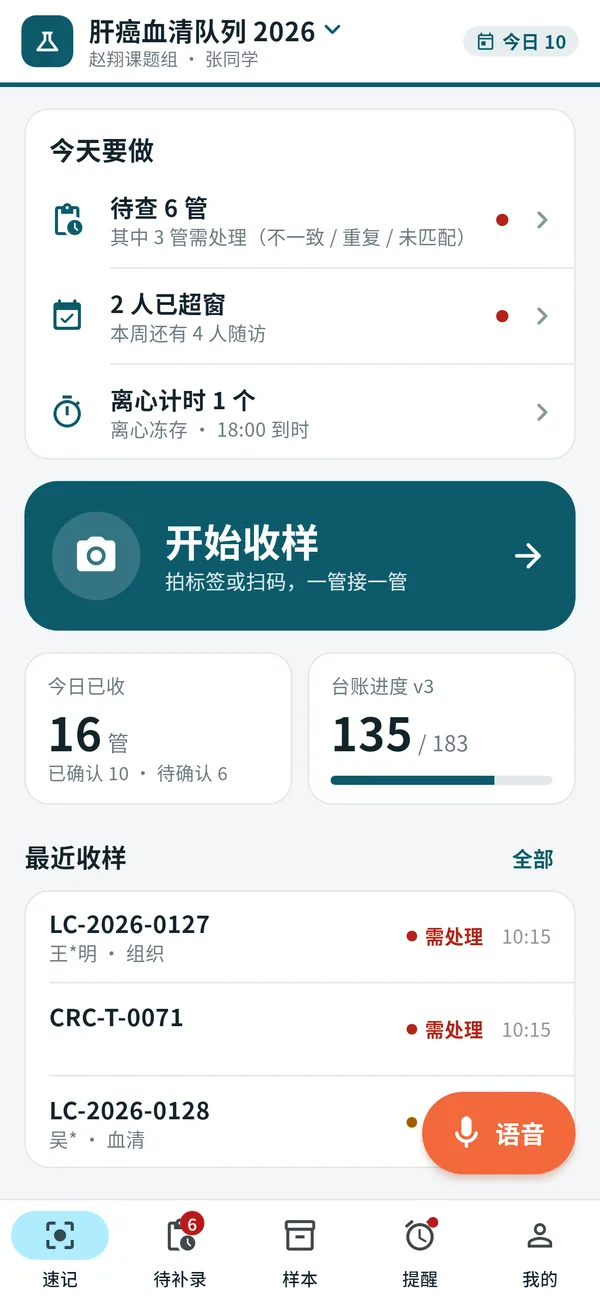
Three ways to log a tube
Pick whatever your hands allow. Each tube lands as a draft first, and nothing is saved until you confirm it.
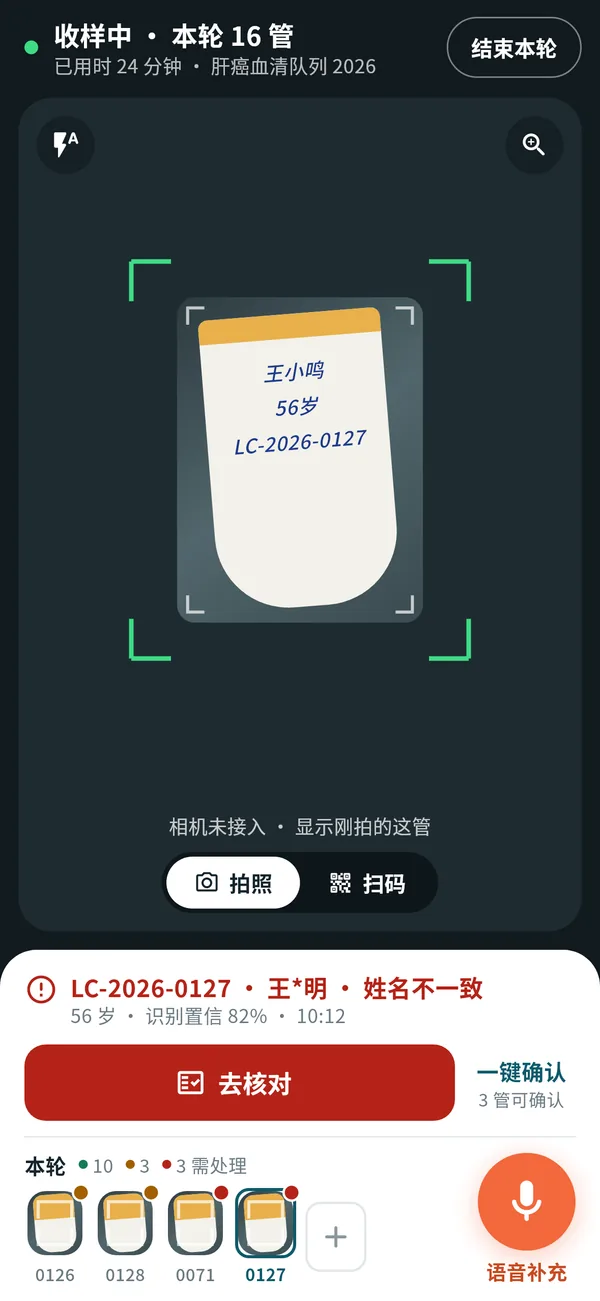
Snap the label
Point the camera at a handwritten tube. Name, age and sample code are read into a draft for you to check.
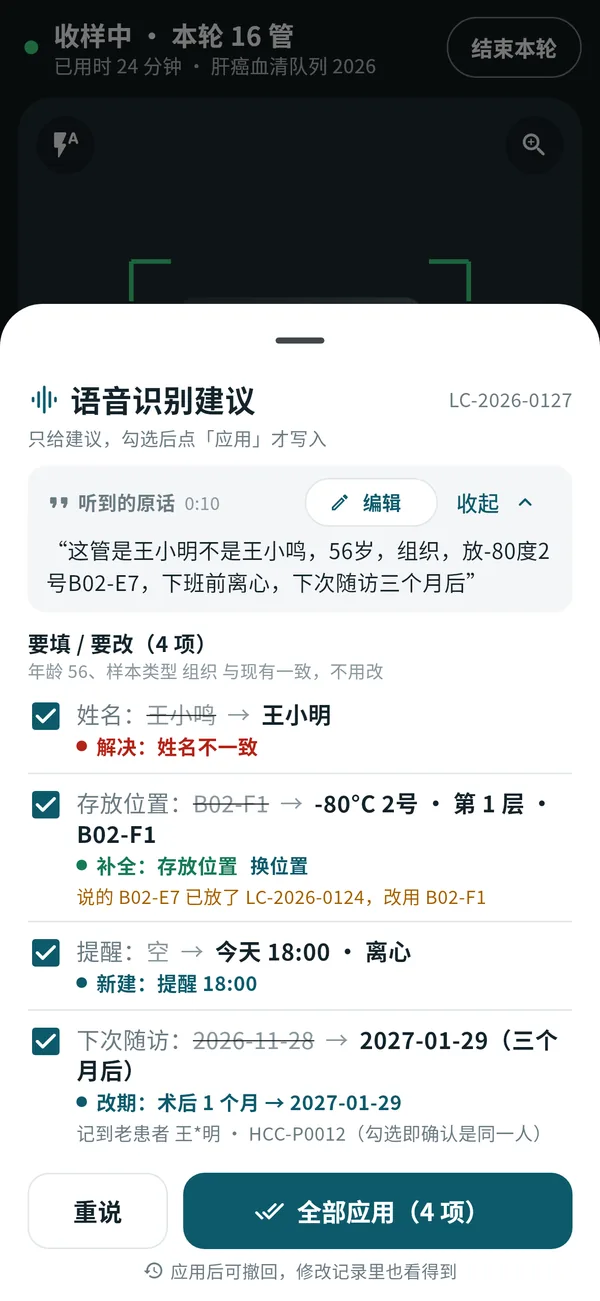
Say it once
"Wang Xiaoming, 56, tissue, box B02 slot E7, spin down before I leave, next follow-up in three months." One sentence fills the fields, the box slot and the reminder.
Scan the code
Already-labelled tubes are matched to your ledger the moment the barcode or QR code is in view.
Everything a sample bank needs, in your pocket
Fast collection rounds
Start a round and confirm tube after tube. A counter, a timer and thumbnails show where you are; tubes that need a second look are flagged.
Freezers, racks and box maps
Set up freezers, shelves and boxes (9×9, 10×10 or your own layout) and see every slot at a glance. New tubes go to the next free slot.
IDs and labels
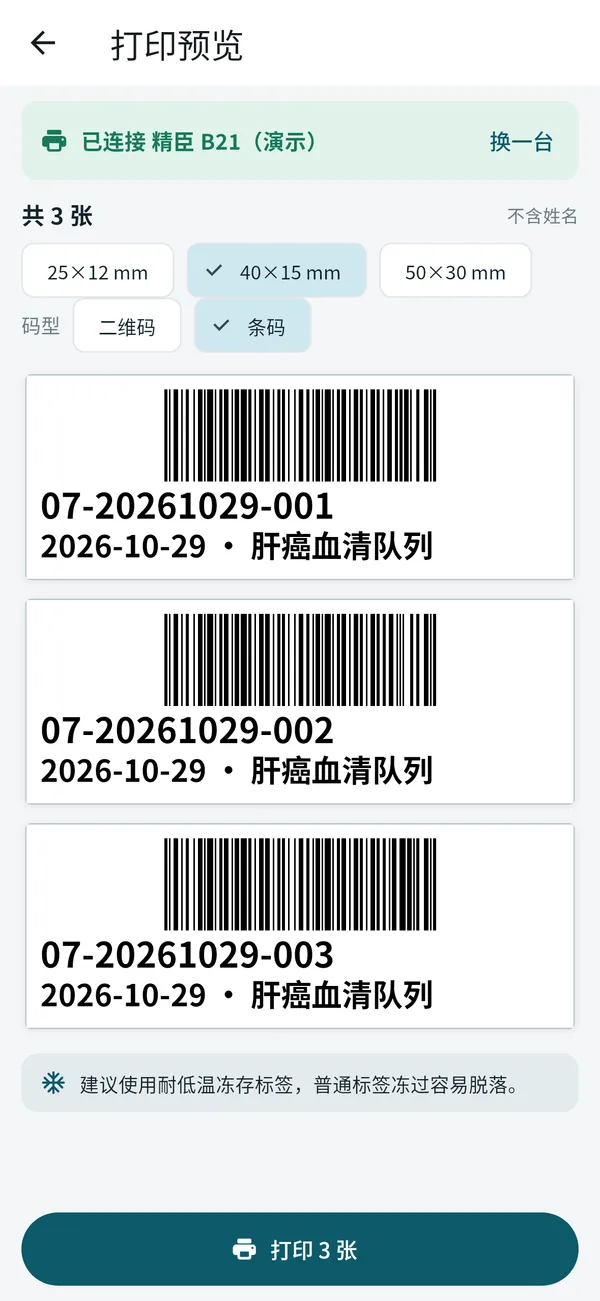
Your lab's numbering rule (prefix, date, type, serial) creates IDs automatically, with aliquots as -01, -02. Print barcode or QR labels in common sizes.
Box photos, sorted out
Photograph a whole box and SampleNote reads the codes in it, then lists only what differs from your records so you can fix them one by one.
Batch moves and stocktakes
Scan a stack of tubes, then move, check out, lend or return them in one go. A quick stocktake shows what is missing, extra or in the wrong place.
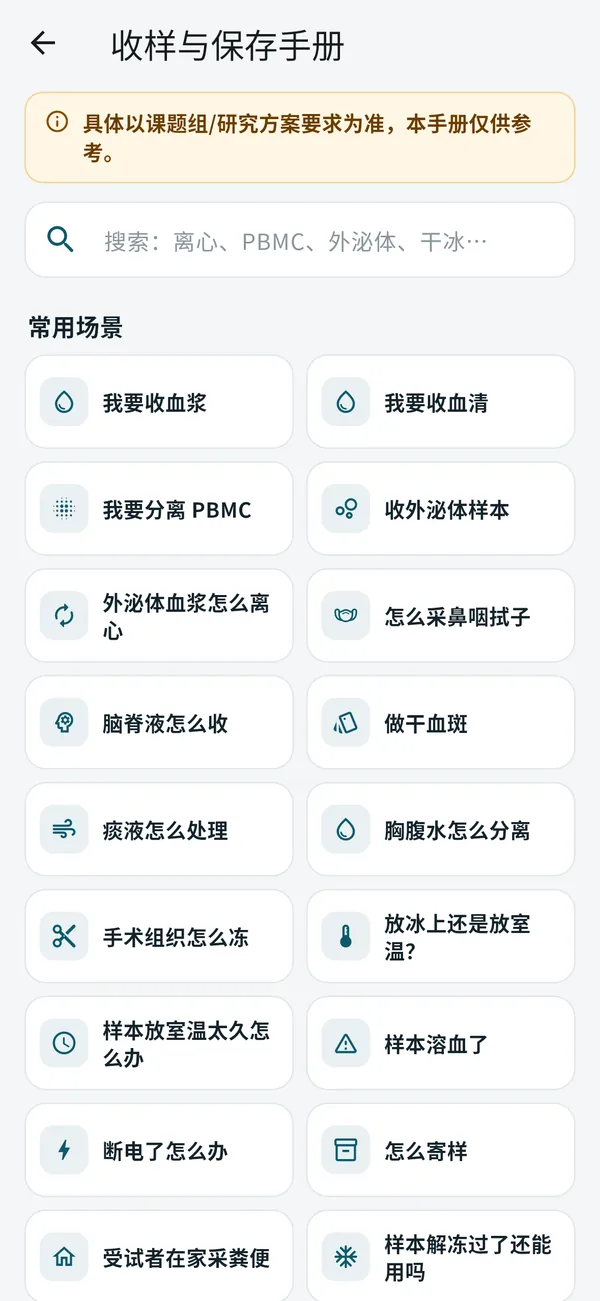
Collection & storage handbook
21 practical guides for serum, plasma, PBMC, exosomes, tissue, swabs and more, with sources for every point. English edition coming soon.
Private on your device
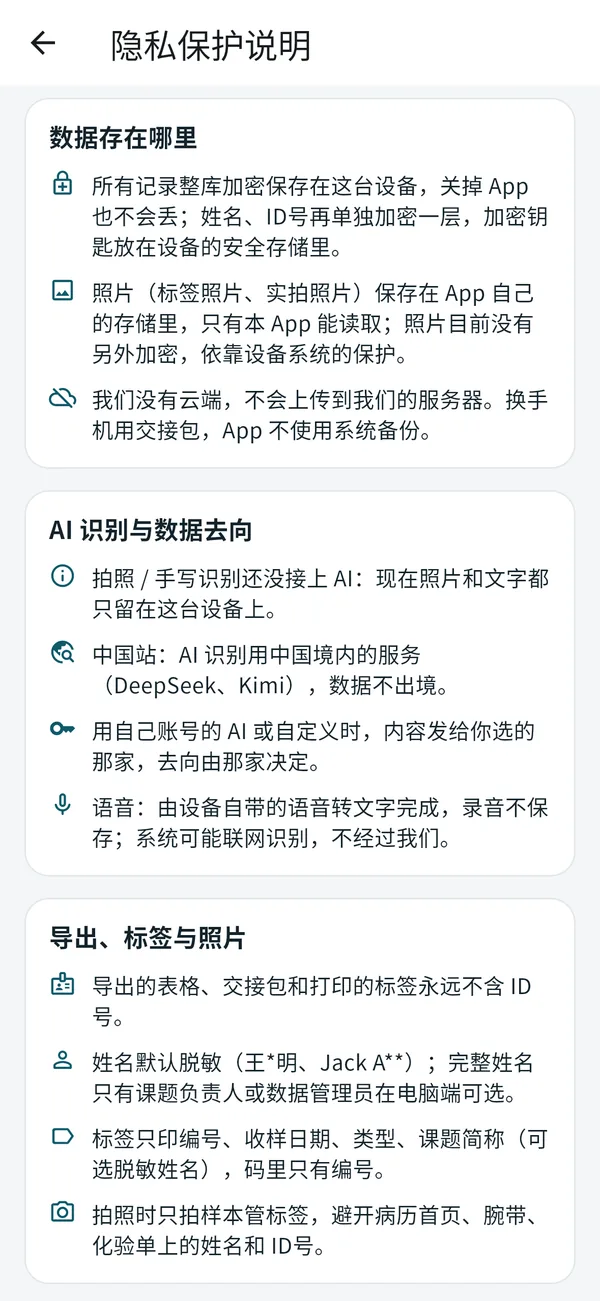
Records and photos are stored encrypted on your own device and never in your photo library. Names are masked in lists and exports by default.
Built for lab groups
Owners, admins and members each get the right access. Full details can only be exported by the owner or a data manager they name — and only on a computer.
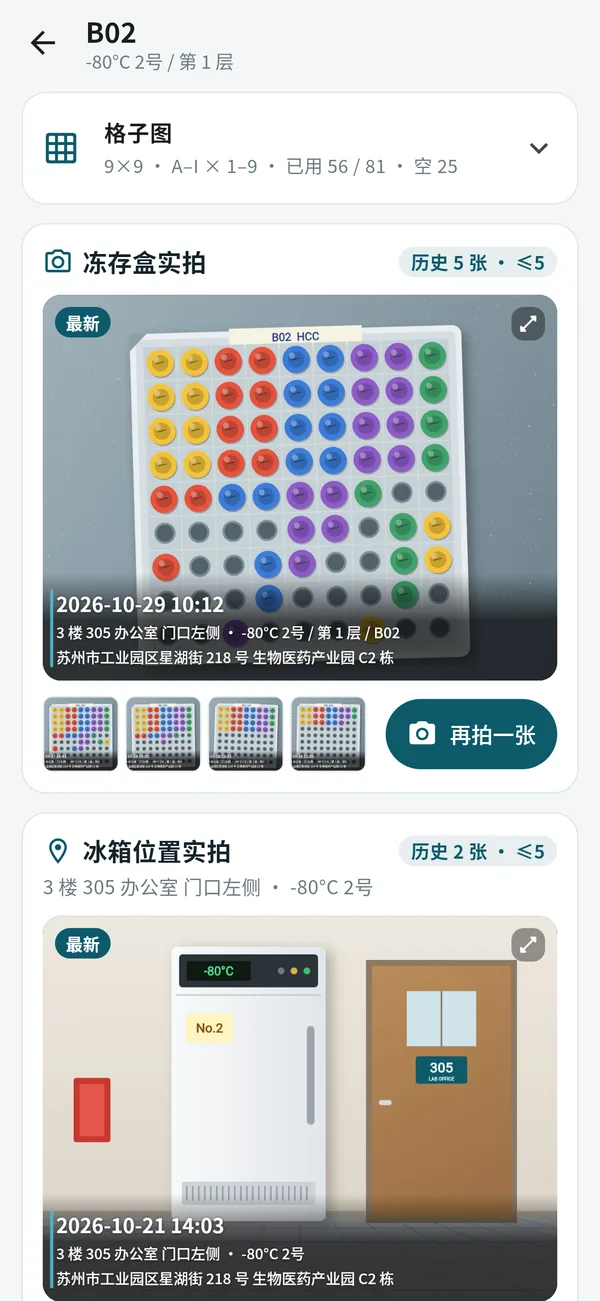
Know where every tube is — and what the box looks like
Each box keeps a slot map plus dated photos of the box and of the freezer it sits in, stamped with time and location. When a colleague asks "which freezer?", you can show them.
- Slot map with used and free counts for every box
- Recent photos of each box and freezer, with history
- Alerts when a box is almost full or a loaned tube is overdue
- Set up storage on your Mac or phone, then pick a slot as you collect

Print a label before the tube leaves your hand
IDs follow one rule across the whole lab, so a tube collected today can be found by anyone next year. Labels carry the ID, the date and the project — never the patient's ID number.
HandbookNot sure how to handle a sample? Ask the handbook.
"Room temperature or on ice?" "The sample thawed — is it still usable?" Search or tap a common situation, and open the right card in the middle of a collection round. Works offline.
Patient data stays with you
Stored on this device
No cloud account is needed. Records and photos are encrypted on your phone or Mac.
Masked by default
Names appear as "Jack A**" in lists and exports. ID numbers never leave the app.
You confirm every change
Suggestions from photos and speech are only suggestions until you tick them.
Hand over safely
Moving to a new phone or passing work to a colleague? Create an encrypted handover package.
One sample bank for the whole group
Each person has their own drafts, while the group shares project folders. Roles keep everyone working without seeing more than they should.
Owner
Sets up projects, numbering and storage, names up to two data managers, and can export full details on a computer.
Admin
Helps run the project: manages folders, members and storage layout.
Member
Collects and organises samples; exports always come out masked.
Coming soon to your devices
SampleNote is getting ready for release. Check back here for the download links.
iPhone
Collect at the bedside or the bench
Coming soonMac
Set up storage, import and export ledgers
Coming soonAndroid phones
Same features as on iPhone
Coming soonAbout us
SampleNote is operated by Nanjing Weikeduo Information Technology Co., Ltd.